Difference between revisions of "Banner Deed"
(Added infobox, fixed links and category.) |
|||
| Line 1: | Line 1: | ||
| − | [[Image: | + | {{Infobox item |
| − | A 2nd year [[ | + | | name=A Banner Deed |
| + | | image=Deed.png | ||
| + | | weight=1 | ||
| + | | vetreward=2 | ||
| + | }} | ||
| + | [[Image:Hanging banner.png|frame]] | ||
| + | A 2nd year [[veteran reward]], the Hanging Banner allows you to decorate your home with a variety of banners. Your account must be 24 months or older to place one. There are many different styles to choose, each with a gold or silver bracket to hang from. To place, double-click the banner deed and select the type you wish to use. You must target a tile next to a wall or placement will be aborted. The banner will automatically choose the facing depending on wall. If you target a corner, you will be presented with another menu to choose the facing. You can dye the banner different colors with a [[Dying Tub]], [[Black Dye Tub]], or [[Special Dye Tub]]. | ||
| + | |||
==Notes== | ==Notes== | ||
| − | |||
* Can face East or South | * Can face East or South | ||
* Dyable | * Dyable | ||
* Takes up 1 tile | * Takes up 1 tile | ||
* Double-click the banner to redeed | * Double-click the banner to redeed | ||
| − | * The banner can be | + | * The banner can be locked down and raised higher with an [[Interior Decorator]] |
| − | + | ||
| − | + | <gallery> | |
| − | + | Image:Banner examples.jpg|Click the image for a larger example of all the banner types | |
| + | </gallery> | ||
| + | |||
| + | ==See also== | ||
| + | * [[Veteran reward]] | ||
| − | [[Category:Veteran | + | [[Category:Veteran rewards]] |
[[Category:House Addons]] | [[Category:House Addons]] | ||
Latest revision as of 08:26, 19 May 2012

|
| A Banner Deed |
| 2nd Year Veteran Reward |
| Weight: 1 Stone |

A 2nd year veteran reward, the Hanging Banner allows you to decorate your home with a variety of banners. Your account must be 24 months or older to place one. There are many different styles to choose, each with a gold or silver bracket to hang from. To place, double-click the banner deed and select the type you wish to use. You must target a tile next to a wall or placement will be aborted. The banner will automatically choose the facing depending on wall. If you target a corner, you will be presented with another menu to choose the facing. You can dye the banner different colors with a Dying Tub, Black Dye Tub, or Special Dye Tub.
Notes
- Can face East or South
- Dyable
- Takes up 1 tile
- Double-click the banner to redeed
- The banner can be locked down and raised higher with an Interior Decorator
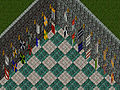
Click the image for a larger example of all the banner types
